Scam Defence for Business

DBS SAFE Measures

Your vigilance is the strongest defence against business fraud. 

Set, Assess, Fortify, Educate. Use these rules of thumb to get the the upper hand over scammers, and protect yourself and your business. 

By setting strict controls, carefully accessing and verifying requests, fortifying your systems, and continuously educating your team — you can significantly enhance your business resilience against financial crime. 

How to identify fraudulent communications
Emails/Mails

Common signs of phishing emails or mails:

  • Urgent language with threat such as “act now” or “immediate action required to avoid consequences”
  • Requests for your personal information such as your username, password, bank details or verification codes
  • Unexpected attachments or suspicious URL links provided
  • Poor grammar or spelling, with images and graphics that are poorly formatted
  • Email addresses are spelled weirdly or suspiciously, with characters replaced such as “1” for “I
Websites

Common signs of scam websites:

  • Lack of "HTTPS" in the URL address or lack of padlock symbol in the site information found on the address bar of web browser
  • Poor website design with outdated or unprofessional graphics, broken links or low-quality images
  • Missing contact information
  • No privacy policy or terms of service
  • Unusual URL with weird or misspelled domain names
  • DBS official website URL addresses will always have this domain structure: dbs.com.hk/xxx. There will never be a suffix before or after “dbs”, such as “dbs-cash.com.hk” OR “hk-dbs.com”
Phone call/SMS/Messaging apps

Common signs of scam calls, SMSes or messages:

  • Unrecognised number and an unfamiliar voice
  • Urgent language with threat such as “act now” or “immediate action required to avoid consequences”
  • Requests for your personal information such as your username, password, bank details or verification codes
  • Unsolicited calls
  • DBS will only send essential SMSes with no clickable links. Alerts in the form of push notifications will appear only via the DBS IDEAL mobile app.
Enhanced security measures against scams
1. How is DBS protecting me as a corporate/business customer?

Your safety when banking online remains our top priority. As part of our multi-layered defence against fraud, we: 
 
Use secure technology and protocols to ensure your information and money are safe, whenever they bank online. For example, we employ multi-factor authentication when our customers perform online transactions. 

Have a dedicated anti-fraud team to monitor, intervene in and review fraud alerts. The team ensures timely freezing of any suspicious/compromised accounts. 

Carry out transaction screening with our advanced monitoring and surveillance systems, which help us to detect unauthorised activities on customer accounts. This allows us to detect distinct changes in user behavioural patterns, cross-reference unusual account changes, as well as screen unusual transfers.  

Fighting scams is a collective effort. We encourage you to remain vigilant when performing any banking transactions online, including checking and verifying the sender’s identity before clicking on any link. 

2. Are there any additional step(s) taken by DBS to safeguard corporate customers against the potential integration between phishing sites and customer bank accounts?

DBS does not provide any integration services to third party sites that are not fully validated by our internal teams.  Any integrations with external platforms, such as accounting platforms or marketplaces, are strictly controlled and must pass our rigorous due diligence process. 

As an additional layer of security, users must authenticate using their existing credentials and security protocols each time they access banking services via validated external platforms or marketplaces. 

3. Why does corporate banking allow links in emails?

As per Hong Kong Monetary Authority’s guidelines, we will not send SMS or emails with embedded hyperlinks which direct you to our websites to carry out transactions.

We urge you to remain vigilant when performing any banking transactions online, including checking and verifying the sender’s identity before clicking on any link. 

When in doubt, contact DBS and always verify directly with us for any requests.  You may contact us and we’d be happy to assist.
 

4. Is there a way for me to be notified for transactions on IDEAL?

For important alerts like transaction approval alerts, you will receive notification via SMS and email by default after each approved transaction to enhance the safety and security of your account.

You may create and manage additional alerts in DBS IDEAL to be notified on payment status updates, which may help detect fraud early. Please click here for more information.

For these additional alerts you have created, we will use email and push notifications as our default channels of communication. 

Please ensure your registered email address is valid and up to date.
 

5. What happens when a fraudster attempts to change the mobile number and/or email address? Will I receive a notification?

You will receive notifications on both the old and new mobile number and/or email address when you successfully change your account’s mobile number and/or email address.

If you did not initiate these changes, contact us immediately.

6. Is Digital Token still safe?

Yes, the Digital Token is built with global security standards and forms part of our multi-layered authentication to enhance the safety and security of your accounts.

7. Is there a cooling period after digital token set up to prevent fraud?

Yes. From July 2025 onwards, there will be a cooling period after setting up the digital token, during which certain high-risk transactions (such as approving payments) will not be allowed.

8. How will the bank prevent further outflow of my funds?

Upon suspected compromise of user account, access to DBS IDEAL will be revoked to prevent any transaction authorisation via DBS IDEAL.

9. Why do I see a pop-up message whenever I add or edit a payee?

The pop-up message is part of our efforts to protect you against scams which involve fraudsters requesting for payments to be made to their bank accounts. 

We urge all customers to verify that the payee details are legitimate before proceeding with adding or editing a payee.

If you did not initiate the addition or editing of a payee, contact us immediately.

10. I received an SMS and email notifying me of a new login to my IDEAL account. What should I do?

This SMS and email is part of our security measures to keep you notified on your IDEAL account activity. If you did not perform the login, contact us immediately.

11. How can I differentiate a scam SMS from an official one from the bank?

We will only use the registered sender IDs starting with “#” to send one-way SMS to our customers.

12. What should you do if my DBS IDEAL app access is restricted due to mobile threats detected?

Follow our security guide to restore your DBS IDEAL app access.

IDEAL security tips
Account and Login Security
  • Keep your login details private. Never share your User ID, PINs (login, token, or any other), or security token with anyone. We will never ask you for these, whether in person, by phone, email, or letter.
  • Secure your PINs: 
    • Destroy the paper copy of your PIN and do not write it down.
    • Choose PINs that are tough to guess. Stay away from personal details like your name, birthday, or phone number. A mix of numbers and letters makes your PIN much stronger.
    • Do not use the same IDs and PINs for DBS IDEAL as you do for other online services.
    • Change your initial PINs when you first log in to DBS IDEAL
    • Update your login and token PINs regularly.
  • Never write down your PINs on any device used for e-banking or on anything kept near it, and do not record them without disguising them.
  • Beware of scams. Be extra careful with suspicious emails or websites, as they might try to steal your PINs. Attackers can install hidden programs to record what you type.
  • Log in often. Log in to DBS IDEAL regularly to keep your credentials active. If you do not log in for over a year, we might temporarily suspend your access for security.
  • Only you should use your security tools like your PINs or tokens.
     
Device and Browsing Security
  • Do not leave devices unattended. Always log out of DBS IDEAL and lock your computer, token, or any device you have used to access our service. If you have a physical token, keep it in a safe place.
  • Always log out properly when you're done using DBS IDEAL.
  • Using a shared computer? Clear your browser's temporary files after each session. This helps remove sensitive information like login credentials.
  • Stick to our official website. Always access DBS IDEAL by typing our website address directly or using a trusted bookmark. Never click on links from other websites or emails, as these could be fake. You can check for the "lock" icon in your browser's address bar to confirm our security certificate.
  • Spot suspicious activity. If you see strange pop-ups or your computer slows down a lot while you're on a bank website, log out right away. Scan your computer for viruses and let us know. Don't type in any information.
  • Avoid public computers. Do not use public computers (like those at cyber cafes) to access DBS IDEAL, as they might have hidden programs that can steal your information.
  • Keep software updated. Always use the latest version of your internet browser for the best security features. Clear your browser's cache after each session, especially on shared PCs.
  • Never save PINs using your browser's "AutoComplete" feature. You can turn this off in your browser settings.
  • Protect your devices. Make sure your personal firewall and anti-virus software are up-to-date. Regularly download updates for your anti-virus software, operating system, and internet browser.
Transaction Security and Monitoring
  • Challenge codes are for transactions only. Only enter a challenge code into your security device when you are actively making a financial transaction. We will never ask for a Challenge/Response when you are just logging in.
  • Check transaction post approval alerts. We will send SMS and email alerts for high-risk transactions to your registered mobile number and email address shortly after they are approved.
  • Keep contact details current. Ensure your mobile number and email address in your DBS IDEAL profile are always up-to-date to receive important notifications.
  • Regular checks. Regularly review your account balances and statements to spot any unusual transactions. Notify us as soon as possible if you identify any unusual or suspicious transactions.
  • Follow our guidance. Always follow our website login instructions and security tips when making financial transactions.
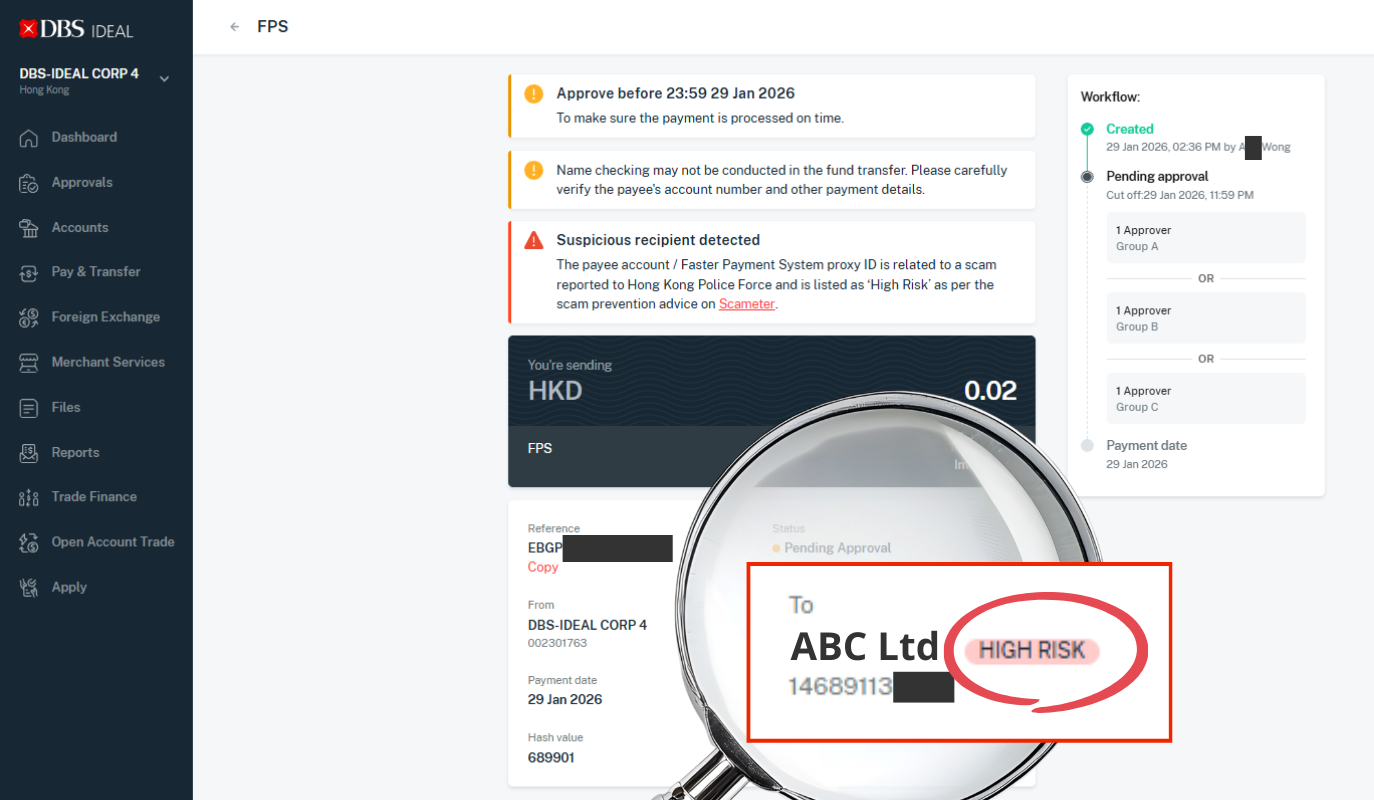
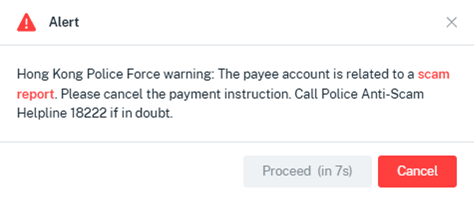
  • Verify payee details. DBS IDEAL is linked to the Hong Kong Police Force’s “Scameter” database. For real-time local transfers, the system will warn you if the recipient's account is on the "Scam Alert" list or flagged as “High Risk”.


  • Set up payment related alerts. Set up real-time alerts for transactions above certain limits, payments to new beneficiaries (for FPS proxy), or any unusual activity. This helps you react quickly to anything suspicious.
Reporting and Response
  • Report immediately. If you think your login details, PINs, tokens, or devices have been compromised, lost, or stolen, or if you notice any unauthorised transactions, please tell us right away. It is important to let us know as soon as you reasonably can.
  • How we respond. Once you report a security incident, we will quickly suspend or end the affected access and do our best to stop any outstanding instructions on DBS IDEAL.
     
Internal Controls and User Management
  • Use dual control (Maker-Checker Process). In DBS IDEAL, this means no payment can go through without a second person reviewing and approving it.
  • Review user access regularly. Make sure you regularly check and update user roles and access rights. This ensures that only authorised staff can start or approve payments.
Suspect you or your business are a victim of a scam?

Find out what you should do next when you suspect you’re a victim of an alleged scam or fraud attempt.

DBS IDEAL

Call us Report to Hong Kong Police Force   Secure your
IDEAL profile


Reporting can be done 24/7, at any time. Bogus Hotline:
(852) 2290 8345
Or 
DBS BusinessCare:
(852) 2290 8068
(9.00am to 6.00pm, Mon - Fri 9.00am to 1.00pm, Sat (excluding PH)

Email us

Write to us, and we’ll respond by the next business day. 

Email: 
[email protected]


Call Police Anti-Scam Helpline:
18222 

Hong Kong Police website - 
eReport Centre


If you are our DBS IDEAL customer with Customer Self Administration access, you may login to DBS IDEAL and follow the user guide to suspend your profile.


Recent scams & frauds

Visit the DBS Security website for more information including the latest news and tips to help enhance your online banking security.