Merchant logo

As one of the largest electronic appliance retail chains in Hong Kong, Suning Hong Kong offers a wide selection of electrical and digital products.

Up to HK$600 “InstaRedeem”

DBS x Suning HK offer

Make a minimum single net spending at SUNING Hong Kong stores, online shop or mobile app during the promotion period and enjoy:

 Single Net Spending"InstaRedeem"
Offer 1HK$3,500 to below HK$6,000HK$100
Offer 2HK$6,000 to below HK$10,000HK$150
Offer 3HK$10,000 or aboveHK$300

(Each DBS Card+ app account can enjoy either Offer 1, Offer 2 or Offer 3 at most once a month during the promotion period, with a monthly maximum of HK$300 and a total maximum of HK$600 during the promotion period.)

Remarks: 1. The "InstaRedeem" offer above is applicable to Principal Cardholders of DBS Credit Cards. Principal Cardholders are required to install DBS Card+ app and register for a DBS Card+ app account, and turn on the notifications in DBS Card+ app to participate in this promotion. Principal Cardholders must conduct the Eligible Transaction by 31 Oct 2026 and tap the “InstaRedeem” button for redeeming the Offer by 15 Nov 2026 23:59 (HKT); otherwise, it will be considered as giving up the Offer on its own. 2. Offer quotas apply and are available on a first-come first-served basis according to the time at which the “InstaRedeem” button is tapped. A quota full message will be shown on this promotion webpage if quota of the Offer is full. 3. All payments via eWallet (except for Apple Pay, Google Pay and Samsung Pay) are not applicable for the calculation of Eligible Transactions. 4. The "InstaRedeem" offer of this Promotion cannot be enjoyed in conjunction with other "InstaRedeem" offers/rewards provided by the Bank and the merchants.


SUNING HK Online Shop    SUNING HK Stores


Promotion Period

  • 1 Sep to 31 Oct 2026


Enjoy “InstaRedeem” in a Few Steps
Step pic

Step 1:
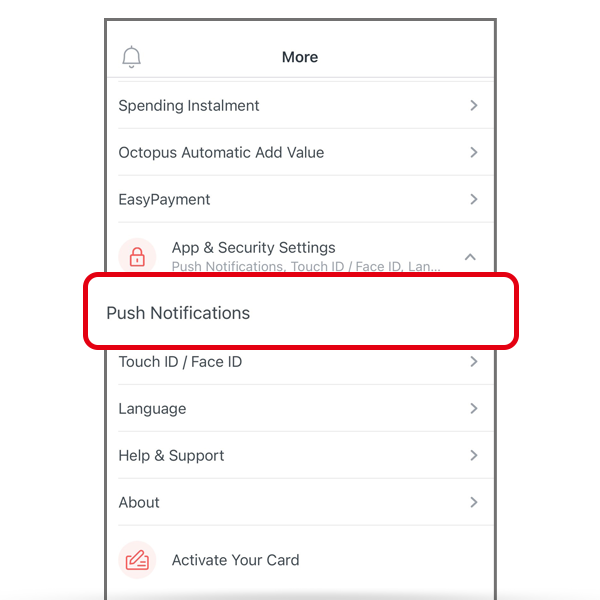
Tap “More” in DBS Card+ app > “App & Security Settings” > “Push Notification”> Turn on the notification for “InstaRedeem”

  
Step pic

Step 2:
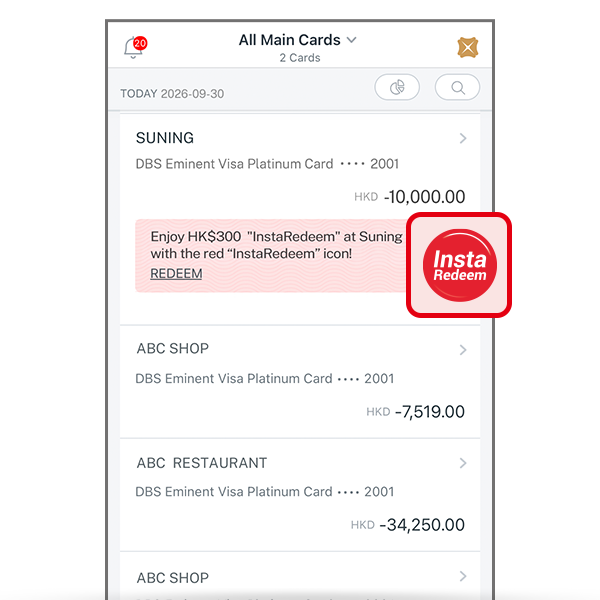
A red “InstaRedeem icon” will be displayed on the “Spending” page after transaction is completed, tap this icon

  
Step pic

Step 3:
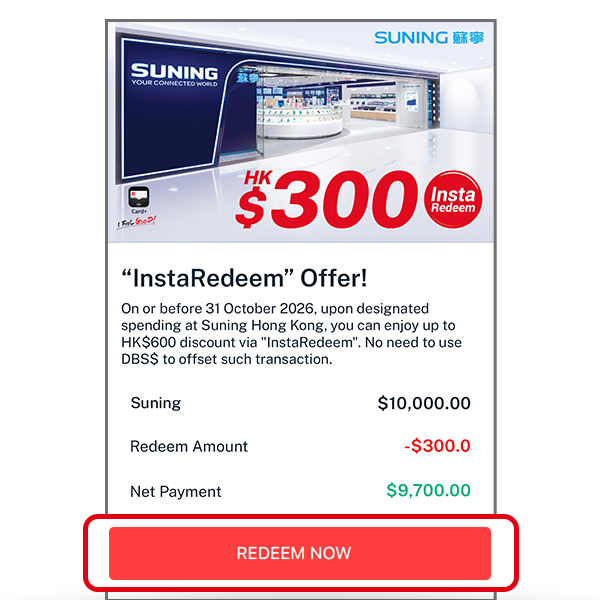
Tap “REDEEM NOW”

  
Step pic

Step 4:
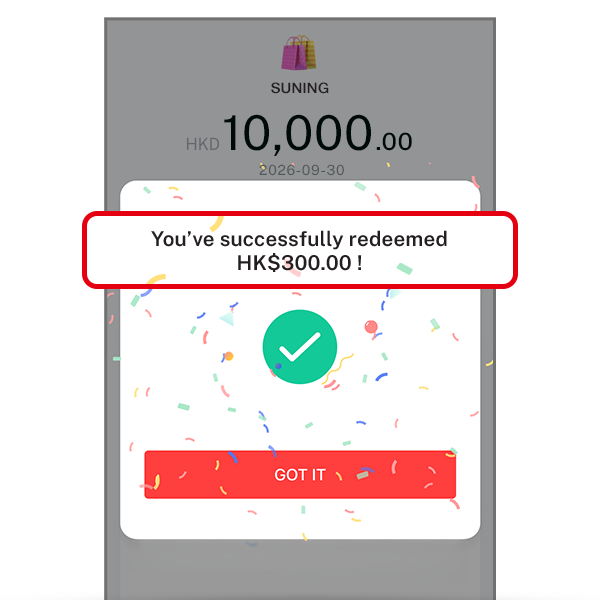
All done!


Explore More

CardsPromotions