DBS UnionPay Diamond Debit Card
Submit your application via our digital services.
Product Highlight
- 1st in market UnionPay Signature-based Multi-currency Diamond Debit Card
- The most currency options available in the Hong Kong market: with easy access to 14 popular currencies
- include HKD, RMB, USD, SGD, CAD, AUD, CHF, DKK, EUR, GBP, JPY, NOK, NZD, SEK.
- Access to the largest card + mobile payment network in GBA and mainland China
- Cards made of 100% recyclable material
How to apply for a DBS UnionPay Diamond Debit Card
New to DBS Customers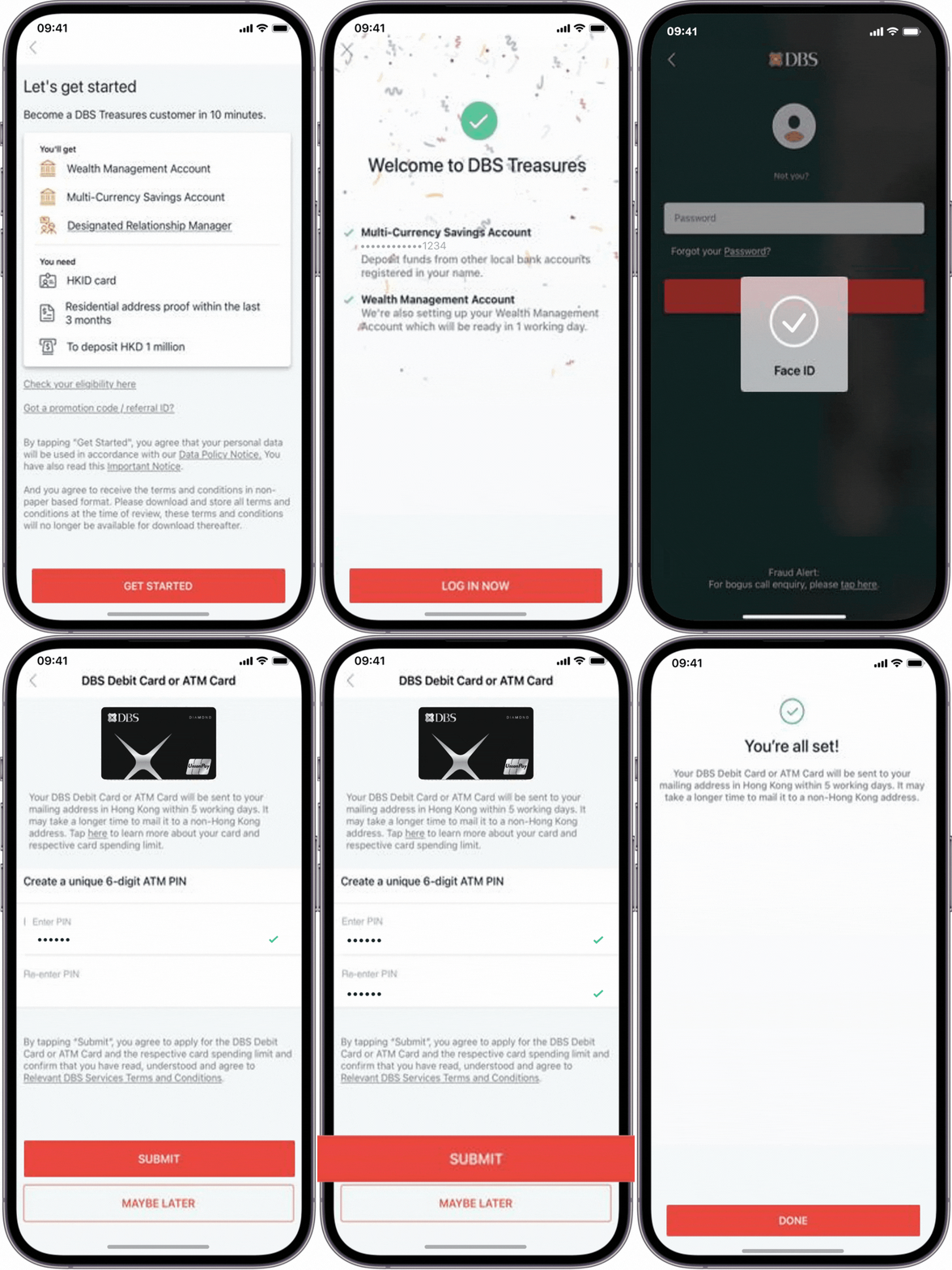
-
Step 1Apply for the DBS Multi-Currency Account via DBS digibank HK app
-
Step 2Complete first fund-in and get redirected to the debit card application page
-
Step 3Set up an ATM Card PIN and accept the Terms & Conditions
-
Step 4A virtual debit card is ready on the “Debit card/ ATM Card” page. You will have a pre-activation spending limit of HK$10,000. This limit allows you to spend while your physical card is still being activated. You can link your card to the UnionPay App and start spending with this limit. Please activate your physical card upon receipt to increase your default daily spending limit to HK$50,000

-
Step 1Tap "Debit/ ATM Card" or “ATM Card Services”
-
Step 2Tap “Apply For a New Card”
-
Step 3Your debit card will be automatically linked to your Multi-Currency Account and press “Next”
-
Step 4Set up an ATM Card PIN and accept the Terms & Conditions
-
Step 5A virtual debit card is ready on the “Debit / ATM Card” page. You will have a pre-activation spending limit of HK$10,000. This limit allows you to spend while your physical card is still being activated. You can link your card to the UnionPay App and start spending with this limit. Please activate your physical card upon receipt to increase your default daily spending limit to HK$50,000
Frequently Asked Questions
Who can apply for a DBS Diamond Debit Card?
Customer who have a HKD multi-currency account (apart from non packaged customers) can apply for a DBS Diamond Debit Card.
I have already have an ATM card, can I still apply a new debit card?
Whether you can apply for a new debit card depends on if your existing card is already linked to your HKD multi-currency account.
If you already have a HKD multi-currency account:
- Go to the "ATM/Debit Card" page and click "Apply for New Card".
- If you see a message that there are no available accounts, it likely means you need to replace your existing card instead of applying for a new one.
What should I do if I don’t have an MCY account but would like to apply the new debit card?
If you do not have an MCY account but would like to apply for the new debit card, you will first need to open an MCY account at one of our branches.
If you already have an MCY account that is not denominated in HKD (for example, it is in another currency), you will need to perform a foreign exchange transaction to convert your existing MCY account balance to HKD. This is to ensure you have an HKD denominated MCY account, which is required to apply for the new debit card.
Can I apply the new debit card if I don’t have mobile banking?
To apply for the new debit card, you need to have DBS mobile banking activated.
Is there a fee for applying Debit Card/ ATM Card via DBS Digibank HK?
No, there are no fees and charges for Debit Card/ ATM Card application via DBS Digibank HK.
Is there any annual fee for the DBS Diamond Debit Card?
No, you will enjoy $0 annual fees with you DBS Diamond Debit Card.
I want to pay a merchant with my debit card. They ask me to input my password at the POS terminal to complete the transaction, what should I do?
You may input your 6-digit ATM PIN on the POS terminal to complete the transaction.
Are there any handling fees for making overseas purchase with my DBS Diamond Debit Card?
No, we will not charge you any handling fees for overseas purchase with your DBS Diamond Debit Card.
Download DBS digibank HK




Photos are for reference only. Apple, Apple Pay and Apple logo are trademarks of Apple Inc., registered in the U.S. and other countries. App Store is a service mark of Apple Inc. Google Play and Google Pay are service mark of Google Inc.
Was this information
useful?